

Samsung Washer Repair in Miami Gardens, FL
Miami Gardens' water supply contains moderate mineral content that accumulates inside washing machine components over time, reducing efficiency and shortening the lifespan of internal parts. Hood Appliance Repair connects homeowners in Miami Gardens and nearby areas like Carol City and Bunche Park with local independent providers who handle Samsung washer repairs, helping you avoid costly replacements when a timely repair can restore full function.
Samsung Washer Repair Services in Miami Gardens, FL
Homeowners in Miami Gardens rely on their washing machines year-round, but the region's hard water supply can accelerate mineral buildup inside Samsung washers, affecting water flow, drum movement, and overall performance over time. Beyond water quality, the area experiences intense electrical stress during hurricane season when power surges from severe thunderstorms can damage a washer's control board, motor, or other sensitive components—sometimes without warning. When your Samsung washer stops working or begins showing signs of wear, prompt repair becomes essential to avoid a growing backlog of laundry and costlier damage down the road.
Hood Appliance Repair connects Miami Gardens residents with independent local providers who understand Samsung washers inside and out. These technicians diagnose the root cause—whether it's hard-water scale, electrical damage, or a mechanical fault—and focus on getting your machine running reliably again. They take time to explain what went wrong and what repairs will prevent similar issues, then follow up to ensure the repair holds. When you need Samsung washer repair in Miami Gardens, a quick call gets you matched with someone nearby who can help.
Common Samsung Washer Error Codes
Write the exact code down before anything else — Samsung reuses similar codes across models, and the precise characters are what narrow it down. Seven of the twelve below are usually a quick check you can make yourself; the other five need a technician.
Samsung Washer 4C
Often clearable without a technician
What it means: The washer asked for water and did not get what it expected, so it has stopped rather than run a cycle dry. Samsung shows this as 4C on newer panels, 4E on older ones and nF on some models — one fault, three displays.
Why it happens: Almost always something before the machine rather than inside it: a supply tap not fully open, a kinked fill hose behind the unit, or the small mesh screens where the hoses meet the washer silted up with scale and grit.
What you can check: Check both taps are fully open, then pull the machine out far enough to see the fill hoses are not kinked. If that looks fine, turn the taps off, unscrew the hoses at the machine end and look at the inlet screens for debris.
When to call someone: If the supply is good and the screens are clear, the inlet valve on the machine is next, and that is where it stops being an owner check.
Samsung Washer Ub
Often clearable without a technician
What it means: The load has gone off balance in the tub and the washer will not spin it at speed, because an unbalanced drum at spin speed can damage the machine.
Why it happens: Usually one heavy item on its own — a towel, a bath mat, a single pair of jeans — or a load that has twisted into a rope on one side of the drum.
What you can check: Open the door, redistribute the load by hand and restart the spin. Adding a couple of similar-weight items often settles it; washing one heavy item alone rarely spins well.
When to call someone: If it trips on every load including well-balanced ones, the suspension or the sensor reading the drum may need looking at.
Samsung Washer 4E
Often clearable without a technician
What it means: The same not-filling fault as 4C, shown as 4E on older Samsung panels.
Why it happens: A closed or partly closed tap, a kinked fill hose, or blocked inlet screens where the hoses connect.
What you can check: Work from the wall in: taps fully open, hoses unkinked, then the inlet screens at the machine end.
When to call someone: If water reaches the machine freely and it still will not fill, the inlet valve needs testing.
Samsung Washer SE
Often clearable without a technician
What it means: Water is not leaving the machine at the rate the cycle expects, or is not leaving at all. Shown as 5E, SE, 5C or nd depending on the panel.
Why it happens: The debris filter at the bottom front catches coins, hair grips and lint and eventually packs solid. A kinked drain hose or a standpipe that cannot take the flow does the same thing from further down the line.
What you can check: Open the small flap at the bottom front, drain the residual water into a tray and clean the filter. Then check the drain hose behind the machine for kinks and that it is not pushed too far into the standpipe.
When to call someone: If the filter is clean and the hose run is clear, the drain pump itself needs testing.
Samsung Washer UE
Often clearable without a technician
What it means: The same unbalanced-load condition as Ub, shown as UE on some Samsung models.
Why it happens: A single heavy item, or a load that has bunched to one side of the drum.
What you can check: Redistribute the load by hand and restart the spin.
When to call someone: If balanced loads also trip it, the drum suspension is worth checking.
Samsung Washer dC
Often clearable without a technician
What it means: The washer cannot confirm the door is shut and locked, so it will not start or will stop mid-cycle.
Why it happens: Most often laundry caught in the door seal stopping it closing flush, or a door that has been slammed rather than pushed shut.
What you can check: Open the door fully, clear anything caught around the seal, and close it firmly without forcing it. Check the latch and the strike plate for anything obstructing them.
When to call someone: If nothing is obstructing it and the lock still will not engage, the door lock assembly is the usual cause.
Samsung Washer SUd
Often clearable without a technician
What it means: The washer has detected far more foam than the drum is designed to handle, and is pausing to clear it before continuing.
Why it happens: Usually too much detergent, or a standard detergent used in a high-efficiency machine, which foams several times more than an HE formula.
What you can check: Let the machine run its own suds-clearing routine rather than cutting the cycle short. Next load, reduce the dose and check the detergent is HE-rated if your machine needs one.
When to call someone: If it appears with a correct HE dose, something may be holding water in the drum and it is worth having checked.
Samsung Washer 5C
Often clearable without a technician
What it means: The same not-draining fault as 5E and SE, shown as 5C on some Samsung panels.
Why it happens: A packed debris filter at the bottom front, a kinked drain hose, or a standpipe that cannot take the flow.
What you can check: Clean the filter behind the flap at the bottom front, draining the residual water into a tray first, then check the hose run behind the machine.
When to call someone: If the filter is clean and the hose is clear, the drain pump needs testing.
Samsung Washer nF
Often clearable without a technician
What it means: The washer is not filling — the same fault Samsung shows as 4C and 4E on other panels.
Why it happens: A tap that is not fully open, a kinked fill hose, or the inlet screens where the hoses meet the machine blocked with scale and grit.
What you can check: Check both taps, straighten the hoses, then turn the taps off and inspect the inlet screens at the machine end.
When to call someone: If water reaches the machine freely and it still will not fill, the inlet valve is next.
Samsung Washer OE
Usually needs a technician
What it means: There is more water in the tub than there should be, so the washer has stopped filling and is trying to pump out.
Why it happens: Normally the inlet valve passing water when it has been told to close, rather than anything to do with the load or detergent.
What you can check: Turn the supply taps off at the wall so no more water can arrive. There is no owner-side fix for a valve that will not shut.
When to call someone: Promptly — a valve stuck open is a flood risk as well as an error code.
Samsung Washer 0E
Usually needs a technician
What it means: The same overfill condition as OE, shown with a zero on some panels.
Why it happens: An inlet valve letting water through when it should be closed.
What you can check: Shut the taps at the wall to stop the fill. Nothing else here is an owner check.
When to call someone: Promptly, for the same reason as OE.
Samsung Washer ddC
Often clearable without a technician
What it means: The AddWash door — the small hatch in the main door — is not registering as closed and latched.
Why it happens: It is easy to push shut without seating the catch, and a trapped sock or glove will stop it closing flush.
What you can check: Open the AddWash door fully, clear anything caught in it, and press it closed until the catch engages.
When to call someone: If it is properly shut and still reads open, the hatch switch needs checking.
Samsung Washer HE
Usually needs a technician
What it means: A fault in the heater circuit, so the machine cannot bring the wash water up to the temperature the cycle asked for.
Why it happens: A component failure rather than anything that builds up, so it usually appears without warning.
What you can check: Nothing here is an owner check — the heater and its circuit are inside the machine.
When to call someone: When you see it. Cold-water cycles may still run, but the machine is not doing what the programme selected.
Samsung Washer 5E
Often clearable without a technician
What it means: The same not-draining fault Samsung shows as SE and 5C on other panels.
Why it happens: A packed debris filter at the bottom front, a kinked drain hose, or a standpipe that cannot take the flow.
What you can check: Open the flap at the bottom front, drain the residual water into a tray and clean the filter, then check the hose run.
When to call someone: If the filter and hose are clear and it still will not drain, the drain pump needs testing.
Samsung Washer LE
Usually needs a technician
What it means: Moisture has been found somewhere inside the machine it should not be — a leak, not a setting.
Why it happens: Water escaping from a hose connection, a seal or the tub reaches a sensor that shuts the cycle down.
What you can check: Turn the supply taps off at the wall and stop using the machine. The code says water is escaping but not from where.
When to call someone: This needs a technician — tracing the source means getting behind or under the machine.
Samsung Washer 3E
Usually needs a technician
What it means: A motor fault — the drive is not behaving the way the control expects.
Why it happens: A failure in the motor or its control circuit rather than anything to do with the load or detergent.
What you can check: Nothing here is an owner check. A single power-cycle at the breaker clears a one-off glitch; a code that returns is real.
When to call someone: If it comes back after a power cycle, the motor circuit needs testing.
| Code | What it means |
|---|---|
| Ub / UE / U6 | The load is unbalanced inside the tub, so the washer cannot spin it safely. |
| 5E / SE / 5C / nd | Water is not draining at the rate it should, or is not draining at all. |
| dC / dC1 / dL | The door is not being detected as closed and locked, so the cycle will not run. |
| SUd / Sd | An over-sudsing condition has been detected and the machine is pausing to let the foam clear. |
| OE / 0E / OC | There is too much water in the washer, which normally means the inlet valve is passing water when it should be shut. |
| LE / 1C | Moisture has been detected somewhere inside the machine that it should not be, which is a leak rather than a setting. |
| HE / HC | A fault in the heater circuit, so the machine cannot bring the water up to temperature. |
| 3E / 3C | A motor fault — the drive is not behaving as the control expects. |
| tE / tC | The temperature sensor is reporting a reading outside the range the cycle allows. |
| bE2 / 6E2 | A button on the control panel is reading as stuck or continuously pressed. |
Don't see your code? Call (305) 614-5825 — we'll help you track it down.
Common Samsung Washer Problems We Fix
Won't Drain
A Samsung washer not draining often points to a clogged drain hose, pump failure, or filter blockage. The local provider Hood Appliance Repair connects you with will diagnose the cause and restore normal drainage.
Leaking Water
Water pooling beneath or around your Samsung washing machine usually means a damaged door seal, cracked tub, or loose hose connection. A local repair provider can identify the leak source and fix it quickly.
Won't Start
If your Samsung washer won't power on or respond to button presses, the issue may be electrical, a faulty door latch, or a control board problem. The independent provider you're connected with will pinpoint and resolve it.
Loud or Vibrating
Excessive noise or vibration during the wash or spin cycle often signals worn drum bearings, a foreign object inside, or an unbalanced load. A local Samsung washer repair provider can restore quiet operation.
Not Spinning
Clothes coming out soaking wet suggest a broken belt, motor failure, or drum coupling issue preventing spin cycles. Hood Appliance Repair connects you with a technician who can diagnose and repair the problem.
Error Code on Display
Error codes like 4C signal drainage or sensor faults on Samsung washing machines. The independent local provider you're matched with will read the code, identify the underlying issue, and complete the repair.
Why Miami Gardens Homeowners Choose Hood for Samsung Washer Repair
Samsung Washer Repair by Local Pros
Hood connects you with independent local providers who repair Samsung washers throughout Miami Gardens. Fast response times mean your laundry backup resolves quickly, not weeks later.
Clear Communication From Start to Finish
Samsung washer repair goes smoother when you know what's wrong and what it costs upfront. Hood's connected providers explain the issue and next steps in plain language.
Thorough Samsung Washer Diagnosis
Samsung washers fail for different reasons—drum, motor, valve, electrical. Hood's network providers dig into the real cause so your repair holds, not mask the symptom.
Miami Gardens Water Quality & Washer Longevity
Moderately hard municipal water in this region can accelerate mineral buildup inside Samsung washers, shortening their lifespan. Hood's local providers know this risk and can spot related wear early, helping extend your machine's life through preventive insight.
How Our Repair Service Works
Schedule Your Samsung Washer Repair Visit
Contact Hood Appliance Repair and describe your Samsung washer issue—whether it's a leak, cycle failure, or error code. We'll connect you with a local independent provider in Miami Gardens who can assess your machine and arrange a convenient appointment time.
Diagnose the Samsung Washer Problem
The technician inspects your Samsung washer to identify the root cause, checking components like the drum, pump, and electrical connections. In Miami Gardens, mineral buildup from the local water supply can affect washer performance over time, which the technician will evaluate as part of the diagnosis.
Complete Your Samsung Washer Repair
Once the issue is confirmed, the independent provider repairs or replaces the necessary parts and tests your Samsung washer to ensure it's working properly. You'll receive a summary of the work done and can ask questions about maintenance or future care.
Need appliance repair in Miami Gardens? Our technicians can help fast.
Call (305) 614-5825Samsung Washer Repair Across Miami Gardens
Samsung washers in Miami Gardens homes face a particular maintenance challenge rooted in the local water supply. The moderately hard municipal water delivered through Miami-Dade County's system can leave mineral deposits and scale buildup inside wash drums, valve assemblies, and fill lines over time. This buildup reduces water flow, forces the machine to work harder, and can eventually trigger error codes or drainage problems—issues that independent repair providers in the area encounter regularly. Regular descaling and timely repairs help extend the life of your washer and restore full cleaning performance.
Beyond water quality, Miami Gardens residents should be aware that the region's active severe weather season brings power surges that can damage a Samsung washer's control board and electronic components. Lightning strikes and electrical disturbances during thunderstorms are a common cause of sudden appliance failure. Whether you're in established neighborhoods like Carol City or newer areas such as Rolling Oaks, having a trusted local repair provider just a call away means faster response times when your washer stops mid-cycle or displays an electrical fault. Hood Appliance Repair connects Miami Gardens property owners with independent local technicians who understand these regional issues and can diagnose and repair Samsung washers efficiently.
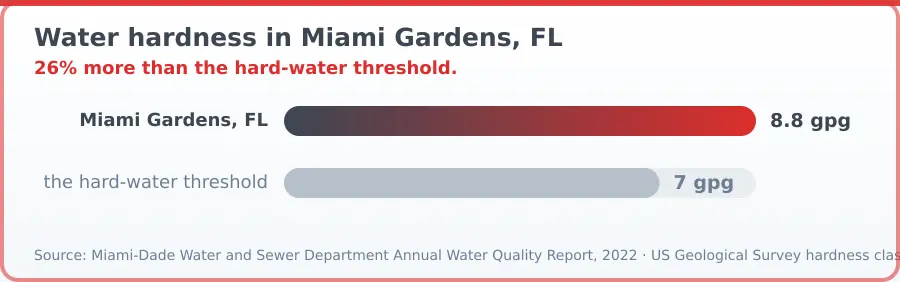
| Location | Water hardness vs the hard-water threshold (gpg) |
|---|---|
| Miami Gardens, FL | 8.8 |
| the hard-water threshold | 7 |
Source: Miami-Dade Water and Sewer Department Annual Water Quality Report, 2022 · US Geological Survey hardness classification. Retrieved October 5, 2026.
Samsung Washer Repair FAQ — Miami Gardens, FL
Samsung Washer Repair addresses issues like drum failures, water leaks, cycle problems, and electrical faults. A local repair provider will diagnose the specific issue, replace or repair faulty components, test the machine, and ensure it runs through a full cycle safely. The scope depends on what's broken—sometimes it's a simple part swap, other times a more involved repair.
Hood Appliance Repair connects you with independent local providers in Miami Gardens who often respond within hours of your request. Availability varies by provider and current demand, but many aim to schedule service within 24 hours. Calling early in the day generally improves your chances of a quicker appointment.
Pricing depends on the specific problem, which parts need replacement, and the repair provider's labor rates. Drain pump failures, control board issues, and drum repairs typically vary in cost. The independent provider will give you a quote based on their diagnosis before proceeding. Contact them directly for pricing details.
Clear the area around your washer so the technician has easy access. Note any error codes or unusual sounds you've noticed and describe them when the provider arrives. Ensure the machine is empty and powered off. If you're familiar with your washer's manual, having it handy can help the technician understand the model better.
Use the right detergent amount to avoid excess suds, clean the rubber seal regularly to prevent mold, and don't overload cycles. In Miami Gardens, where municipal water has moderate hardness, occasional cleaning of the intake filters can help prevent buildup and extend your washer's life. Regular maintenance catches small issues before they become costly repairs.
Power surges from electrical storms during the June through November season commonly damage appliance control boards and motors. If severe weather occurs near your home, a power surge can disable your Samsung washer even if it wasn't running. Installing a surge protector or whole-home surge protection can reduce this risk and help your washer survive the storm season.
More Repairs for This Brand
Homeowner Safety Toolkit
Verify Your Miami Gardens, FL Appliance Repair Company
Before you hire anyone, use these independent national resources to confirm credentials, standards, and track record.
CPSC
Check whether your specific appliance has an open safety recall before paying for a repair — some recalls cover the fix or a replacement for free.
Check for RecallsEPA
Anyone who services a refrigerator, freezer, or other appliance containing refrigerant is legally required to hold EPA Section 608 certification. See what that actually requires.
Refrigerant Certification RulesNFPA
A poorly repaired dryer, range, or water heater is a real fire risk. The National Fire Protection Association's home safety guidance covers what to check after any appliance service.
Appliance Fire Safety TipsBook your Miami Gardens appliance repair today.
Call (305) 614-5825Areas We Serve in Miami Gardens, Florida
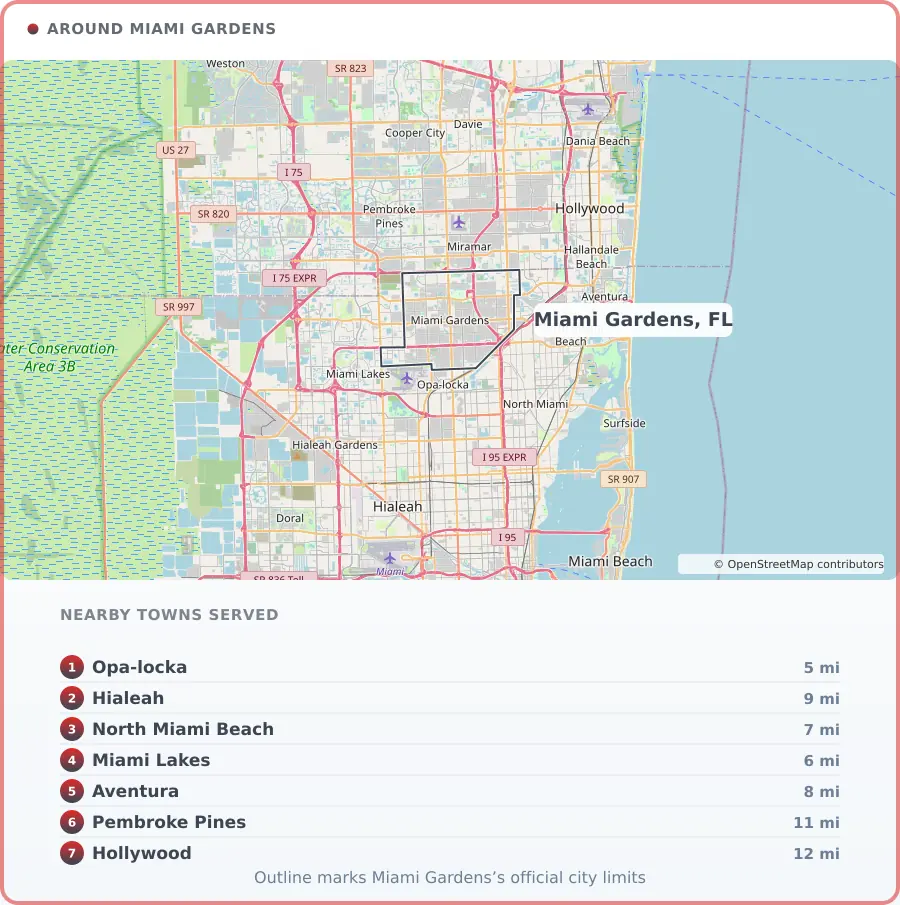
Coverage centres on Miami Gardens, FL and reaches 7 surrounding communities. Response time is what matters most in the hours after a problem is found, so knowing the ground is part of the job.
Miami Gardens, FL Information
Miami Gardens sits in the heart of Miami-Dade County, a densely populated city of roughly 111,640 residents just north of Miami proper. Its skyline is shaped as much by Hard Rock Stadium as by rooftops — home turf for the Miami Dolphins and a hub for major sporting and entertainment events. Beyond game days, the economy also leans on healthcare, retail, and education, with Florida Memorial University adding a strong academic presence.
Neighborhoods like Carol City and Norland give the city its everyday rhythm, where city and county offices, public schools, and retailers such as Walmart and Winn-Dixie keep daily life moving. With Miami's logistics networks close at hand, Miami Gardens blends suburban comfort with big-city energy and genuine neighborhood pride.
Photo: Pietro, CC BY-SA 3.0